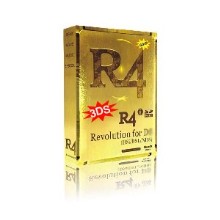
Bonjour , tout le monde . Par le blogue précédent j'ai dit que R4i gold 3DS peut soutenir Nintendo 3DS Ver 2.0.0-2 (J, E, U) directement sans aucune mise à jour! En avons besoin de fait quelque chose pour le fonctionner .
Il y a trois cas
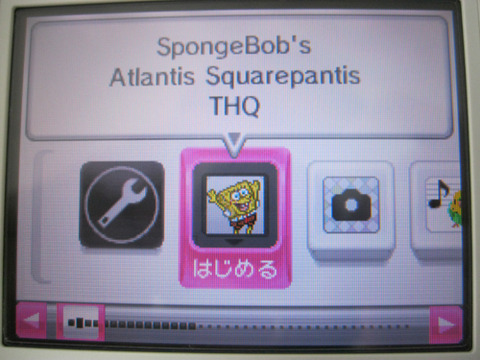
1.Si un "Bob l'éponge"<<SpongeBob's Atlantis Squarepantis THQ>> apparaît sur l'écran après que vous branchez la carte r4 3DS gold dans 3DS, sans modification, directement dans le noyau le plus récent peut soutenir FW2.0.0-2
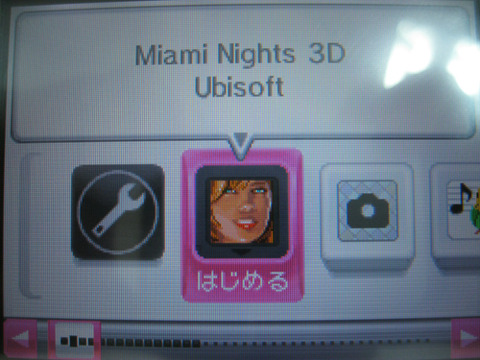
2.S'il ya un "Miami Nights 3D" l'icône <<Miami Nights 3D Ubisoft>>, la mise à jour de linker 3DS R4 gold est nécessaire. S'il vous plaît suivez les instructions suivantes. Note: Le firmware et le noyau de l'or et l'or R4 R4 3DS sont les mêmes.
3 Si , l'icône est <<Meet the Robinsons Disney >>, vous avez besoin de mettent à jour vôtre carte à partir de la start .

Note: Le firmware et le noyau de l'or et l'or R4 3DS gold sont les mêmes. Pour le courant V142C_Patch_R4iGOLD_NDSL.nds
1.Télécharger kernel et firmware à partir du site officiel.
2.Copier le dossier et les fichiers dans la catégorie racine de la carte mémoire microSD.
3.Download le téléchargement des correctifs et décompresser. V1.42C_Patch_R4iGOLD_NDSL.nds copier dans le répertoire racine de la carte microSD.
4 Allumez le V142C_Patch_R4iGOLD_NDSL.nds NDSL .
5 Tirez la flash carte de la NDSL .
6.insérer la carte à NDSL.
7.Appuyez puis appuyez sur la A et la mise à jour commence.
8. Attendez jusqu'à 100 % réussi .Il peux soutenir 3DS 2.0.0.2 maintenant .
Cette carte est compatible avec 3DS V2.0.0-2. Pour vous V142C_Patch_R4iGOLD_NDSi.nds
1.Télécharger kernel et firmware à partir du site officiel.
2.Copier le dossier et les fichiers dans la catégorie racine de la carte mémoire microSD.
3.Download le téléchargement des correctifs et décompresser. V1.42C_Patch_R4iGOLD_NDSi.nds copier dans le répertoire racine de la carte microSD.
4 Allumez le V142C_Patch_R4iGOLD_NDSL.nds NDSL .
5.insérer la carte à NDSL.
6.Appuyez puis appuyez sur la A et la mise à jour commence.
7. Attendez jusqu'à 100 % réussi .Il peux soutenir 3DS 2.0.0.2 maintenant .
This patch is designed for r4ids gold 3ds released by r4ids.cn
In order to make your r4ids gold 3ds run on 3DS V 2.0.0-2 OU NDSi V1.4.2, you should update your r4ids gold with this patch.
Please do as the procedures listed below.(1)The procedures for V142C_Patch_R4iGOLD_NDSL.nds
1.Download the latest WOOD R4 for R4ids gold from www.r4ids.cn and unzip it to the root directory of your tf card
2.Copy V142C_Patch_R4iGOLD_NDSL.nds to your tf card
3.You should get a NDSL
4.Just power your NDSL on and boot up V142C_Patch_R4iGOLD_NDSL.nds
5.Take your R4ids Gold out of the NDSL
6.Reinsert your R4ids Gold into the NDSL
7.Press KEY_A and the updating process will begin
8.You should keep your NDSL powered on during the updating process
9.IF the result shows SUCCESS, it means you have updated your R4ids Gold with success and this card can work on 3DS V 2.0.0-2 OU NDSi V1.4.2For the users whose R4ids Gold has been broken, you can get a NDSL and another flashcard.
Just boot up V142C_Patch_R4iGOLD_NDSL.nds with the other flashcard and reinsert your R4ids Gold.
You can also update your R4ids Gold.(2)The procedures for V142C_Patch_R4iGOLD_NDSi.nds
1.Download the latest WOOD R4 for R4ids Gold from www.r4ids.cn and unzip it to the root directory of your tf card
2.Copy V142C_Patch_R4iGOLD_NDSi.nds to your tf card
3.You should get a NDSi
4.Just power your NDSi on and boot up V142C_Patch_R4iGOLD_NDSi.nds
5.Attention:do not take out your R4ids Gold
6.Press KEY_A and the updating process will begin
7.You should keep your NDSL powered on during the updating process
8.IF the result shows SUCCESS, it means you have updated your R4ids Gold with success and this card can work on 3DS V 2.0.0-2 OU NDSi V1.4.2
Télécharger par site officiel ou lien par ici .
N'hestitez pas à me contacter si vous avez des questions.

